Why SEO Programs Fail So Often.

Why SEO Programs Fail So Often.

It’s math.  Really, think about the numbers for a minute.

Lets say you are an accountant that offers bookkeeping and tax preparation.  You want to get into one of the top 3 ranking spots on Google for “bookkeeping (in your city)”.

1 + 1 = 2

Why one of the top 3 spots ? Because those are the positions that will actually deliver traffic. The rest will at best bring in a dribble of visitors.

Okay, so how many businesses in your city offer bookkeeping (or whatever you do). ? Maybe 500 have web sites that google has indexed. So your odds start at 1 in 167 that you will be in one of the top spots. Based on that it’s not a bet you want to take.  And these numbers don’t even start weighing in the advantages many websites have over yours before you even get to the starting line, such as, the fact they have had a site indexed and well-respected by Google for maybe 10 years.  Huge advantage to the competitor here.

Now, how many of those other businesses have used an SEO or worked on their site to improve its ranking or traffic? I don’t have the answer to that, so lets just assume that all the other 499 business owners receive just as many emails and phone calls about Google rankings as you do every month, and that they, like you, eventually will give in to the constant buzz and give it a go.

The point being, a bunch of your competitors have already made the original journey down the SEO path, and in maybe 200 of 203 cases are NOT in the top three.  Also add in the reasonable assumption that the businesses currently on the first page, and especially in the top positions, have a good SEO firm they have been working with for years.

One of those 200 is most likely the one I will here from to get help. Why?  Because I rarely work with a business who hasn’t tried SEO, and realized all the unfulfilled promises. They’ve spent  $350 to $500 or more for a year with the constant hope that traffic and sales will start coming, and yet, very little has. Why?  Because of the numbers I just mentioned (the odds), the inherent disadvantages their site had to start and needed to overcome, and possible a SEO firm that was overly optimistic based on 1 or 2 success stories they are part of in an unrelated Industry to yours a few years ago.

Hey…  if you track rankings like we do, you will notice something incredible important.  Rankings don’t change much, or quickly for the top ranked sites under competitive keywords (and this seems to hold even more true for “local” sites).

So, now you have a sense for why most SEO programs fail to delivery the anticipated results. My intent here believe it or not, isn’t


to dissuade you from engaging in a SEO program, it is to simply educate you on the odds of success.  There truly are real opportunities to leverage your web site as a lead generating and prospect conversion tool using SEO and other marketing programs, you just need to understand the odds, and be prepared to face those odds with an experience partner, who has proven results as well as utilizing other forms of traffic generation for your site, of which there are many, and some that you may find a far better investment in the beginning as you build a long-term SEO program.


Mike Bayes


Is Local SEO The Right Tactic? Only When You Do Ready Right.

Ready Aim Fire. If you do ready right, the rest will fall into place.

I’ve worked with 100’s of businesses on marketing and sales campaigns, and I have time and time again found that mid market and small business owners have a tendency to approach new sales and marketing campaigns based on what marketing companies, or other business owners suggest or steer them to. This of course can be a disaster. Here’s why.

Add text

Lets say Jim owns a Auto supply company, and is in the same networking group as Mark, who owns a semi truck mobile repair business. They get along well, and one day Jim mentions that his local SEO campaign has brought in a ton of business, and Mark likes what he hears.


So, Mark calls Jims local SEO company to find out more.  The sales representative does a fine job of using all the current Internet vernacular and quotes the normal research on how “people” use the Internet to buy stuff, and that Jim is not taking advantage of this gold mine. Well, heck, it worked for Jim,  maybe it is a good idea.

You see all the issues already I am sure, but I am telling you almost half of the business owners I speak with found me through this type path, and would be an easy sell, if I ddidn’treally have their best interest at heart, or was just so inexperienced that I thought one tactic fits all.

The truth is you have to have a prospect that is online and searching for your service for any SEO to make sense.  So in Mark’s case, I would ask this question first, and if he didn’t have the answer I would say – let’s figure that out before we waste a lot of time and money.

The question is, where do your prospects find services like yours?  Now, having worked with a mobile semi truck repair business, I have pretty good insight into this, and it’s NOT through internet searches. I won’t go on how that buyer finds those services, because every industry and business is different.  It’s the question and answer for your business that counts.

So,  Mark was using the AIM FIRE approach.  The problem is he would be aiming in the wrong direction, because he wasn’t ready. Ready means doing enough research and analysis to understand where you need to be to be found by a prospect.

Abe Lincoln was quoted as saying if he had 8 hours to cut down a tree, he would spend 7 hours sharpening the blade.

If you do ready right, the rest will fall into place.

So you may asked, why don’t marketers and salespeople suggest more “ready” solutions, like research, before they make a suggestion. I assume its one of several things.  They don’t have a ready solution to sell, or they make their money selling what they sell so a ready solution would kill the sale because they are afraid that the research of thought process will end up pointing a different direction than what they offer. Or..

young sales professionals often just don’t have the experience to understand this. Their trained to sell a product, not assess its value.

Take your budget for the next month or two, and spend it on research and analysis just like the really large companies do. They do it for a reason, it just makes sense.

I’ll go into more detail on how and what research and thought process you can use to get ready, and have a successful campaign in the next few blogs.  Until then, don’t FIRE until you are ready.

Mike Bayes


Google Hang Outs Now Available From Your Web Site

This is Important! >>>>>
Google disrupts customer service industry

Did Google just disrupt the disruptors?  The
 tech giant recently announced that it is 
offering the technology for a button that will launch a Google hangout directly from a 
company website.  

 Hangouts is Google's name for its 
videoconferencing service that allow several 
people to join the same video chat from multiple devices, including smartphones. 

  A related service, Hangouts on Air, allows a video conference to be recorded directly to 
Youtube.   Originally a part of its Google+ 
social network, it has since spun off into a standalone service.  

The service was announced on the official 
enterprise blog for Google posted by Stephen 
Cho, Head of Google Apps and Hangouts Technology Partnerships  "With this new Hangouts 
button, apps everywhere will let colleagues, 
partners, and customers meet face-to-face
 anytime, anywhere, and work more effectively together with just one click" Cho explained, "A number of our early partners have already 
enriched their applications with Hangouts".   He specifically mentioned several of their 
partners in the sales and customer service space, "Sales reps working in Salesforce.com can automatically kick off a Hangout with their 
account team through Esna; in myERP, a sales 
rep can start a video meeting with any 
customer prospect.    Zendesk helps support
 agents start a Hangout to consult with other agents and internal staff, while Freshdesk lets a customer service agent Hangout with a customer to quickly resolve support issues".

The hangout start button can be configured by any moderately skilled developer and let you 
specify if it starts up a text chat, a video 
call, a video conference or a recorded on Hangout on Air.   Since the customer has control
 of their own camera settings, this 
essentially allows for deployment of an Amazon Mayday- like customer service button on any 
website or app allowing customers to see and 
communicate with the representative, whether they are using their video camera or not.

It seems that Google has once again put a 
disruptive game-changer on the market.   
As described by the CITEworld blog  
http://goo.gl/KlurVp "Pretty much everybody 
has access to Google Hangouts, and Google is
 letting anybody embed the button. Obviously, you lose some of the really deep functionality for customer service agents to go hands-on 
with customers that Salesforce offers, but 
it's definitely more lightweight and almost 
certainly easier to deploy in an application. 

  There's a move towards using collaboration 
and chat technology for better customer 
service. It's going to be really interesting 
to see if Google Hangouts gets further built
 out as an enterprise offering with that kind of service as the focus".

What will this free application do to the 
large number of startups and small software 
companies have developed similar fee-based 
applications?   No one really knows, but the 
news can't be good.   They will likely either have to either adjust and offer more value
 added services, or incorporate the technology into their own offering.   Clearly this is a development in the customer service technology industry that cannot be ignored.

Companies like www.teledini.com, a client of 
ours seem to like the news.  It will bring 
further viability to WebRTC  and Video applications.

Want To Sell More? Look To Product Development First

Sales is not about convincing people who do not want your service to buy it. Sales is about finding the people who do want your service and letting them buy it.

Odd that this premise is so overlooked in business. I’ve worked with 100’s of small and medium business owners or senior managers who really didn’t get this. And it can be a fatal flaw to a company.

Sales

There is a complete misunderstanding of what a salesperson/group/ division is capable of. I’ve worked with owners of multimillion dollar companies, who really think the simple act of hiring a professional sales person means that sales person should now be able to convert most (or at least a decent amount) of prospects by using the magic they have learned throughout their career, no matter how good a fit the service or product is, no matter the position of the product in the marketplace, no matter the branding of the product. In the mind of the less informed, a sales rep can sell anything.

Add to that the natural and common tendency for owners to have a higher regard for their offering than the market itself, as well as the common optimistic early sales projections and outlook communicated by the new sales force, and you have a disaster waiting to happen.

I should note that I have worked with sales people who can sell anything, but they are very rare, and they generally produce much lower customer loyalty. Perhaps these are the salespeople owners are thinking of when their expectations are that a “sales person” can sell anything.

The solution is a well thought out sales and marketing assessment before you go and buy the farm. And this is tricky, because the reality is marketing is primarily responsible for identifying the target market (People who will like your service) finding out how to reach them , and then attracting them to your sales group or funnel.

Yet most companies I have worked with don’t have a budget or an understanding of how these two key disciplines must work together to achieve success. So they put all their dollars in one or the other, or severely under budget one.

So if you buy into this premise, the fundamental success of sales for you company starts with product development. A good sales rep can’t sell a product that is hard to use, or poorly designed. A good sales rep can sell a product that is easy to use, and has a clear advantage for their target market.

So working relentlessly on improving what you sell, will do more for driving sales than anything else you can do.

After that, you must have a marketing machine to get the service in view of the right buyers. Once that is accomplished, sales comes into play. Sales is the last piece of the sales process, following product development and improvement and then marketing.

So if you’re struggling with sales, perhaps where you should be looking for answers is in your product or service offering, or are you asking your salesperson to be both your marketing department and sales department.

By: Mike Bayes

Enhanced by Zemanta

Lead Generation Is Easy (Not)

Building a Lead Generation Program Is Easy (NOT).

So… I’m asked all the time how to build sales for a business. Should I do Social Media, SEO, Advertising, Direct sales, all of that.

I think the first point to start with any “sales” program is the understanding of one very important principle. So to get to that lets start with this question which is this: Sales starts with and goes no where without what?

There are many good answers to this, you might say..

– A great product, – A sales person, – An offer, – Marketing dollars, and on and on.

But the pragmatic answer is this: Sales go nowhere without “leads”. A lead is a business or person who has been qualified as a prospect AND expressed interest in what ever it is you sale.

This is Important! >>>>>

Lead Generation is hard

Now here is the second principle you must understand….Lead Generation is hard, expensive, and can be very painful. That’s why “inbound Marketing” has become such a big tactic. Inbound marketing whispers the promise of easy leads being sent to your inbox, ready for your sales rep to close.

The mistake in this concept is that Inbound Marketing is HARD, expensive and can be painful. like any other form of lead generation, it just has a prettier face.

So if you want to build sales, you have to understand, it’s going to either cost money, or it’s going to take all your time (if you’re a small company).

How much money depends on your service or product, and market. To get the picture on how you should budget (or spend) on sales (and 30% to 50% of that should be in lead generation) you need to understand there are different type sales strategies and customers. Depending on your growth strategy, and your tactics have a everything to do with the cost.

If you’re in a sustain mode, relying on referrals and luck, then your budget is tiny because it costs very little to acquire referred customers.

If you want new “open market” customers, that’s a completely new game. And these new customers are your growth group. You have to sell to them in a completely different way. They don’t know you, so you have to establish trust in the relationship. That takes time and money.

So here is a simple formula you might consider. A new market customer will cost you at least 15% of your Gross revenue. So if you sell $2500. Web sites, a new market customer will cost $325. Also understand that that’s 15% of a new sale, not 15% of your gross revenue. If your revenue is evenly split between referred customers and open market customers (a nice healthy mix), your budget is 7.5% of all revenue. That’s why the first few years of a business is so tough! Your cost of sale is twice to three times what your established competitions is.

The thing that really stops most companies from investing that 15% is the fact that it’s money up front, and it takes time to get the return. If you want 10 new customers in a quarter (or a day, its all just math) you are going to have to invest $3250.00 , it may take 6 months to see the total first stage results (First stage is the original prospect buys, second stage is when they refer others).

So if you have an ongoing program, you’re into the budget $3250 time 6 months before the first months return is final. Ouch! That’s why most start up sales programs don’t have a positive return until the 9th month.

if you do it wrong (which is easy to do) it’s throwing your money away. So you can start to see the pain… it’s hard, and it’s temporarily expensive. Not only that, but if you do it wrong (which is easy to do) it’s throwing your money away. And the first way to do it wrong is by NOT focusing on lead generation first.

For small companies without a sales department or person, you are going to have to outsource your lead generation. Sorry, no choice if you want to grow. You’re also going to need to put some dollars into it. So if you don’t have 15% of the expected new revenue ready to spend, your not ready. If you want to add $1,000,000.00 in sales in the next 3 to 12 months, you need $150,000.00 in funds. Sorry, that’s the truth. And of that 30% to 50% should be in lead generation.

The bottom line in a successful lead generation campaign is this: If you don’t have the money, it’s not going to work 95% of the time.

So if you do have the money or time where should you spend it for the best return on Investment? Well, that’s a whole new subject, which I will write about soon. But, here’s a big hint, you should start with Lead Generation.

You can generate leads with:

Social media campaigns managed by a professional firm with a great track record.

• Search Engine Optimization
• Email campaigns that drive qualified prospects to euth your site, or your online presentations
• Advertising on any media
• Trade shows
• Direct sales
• Co-op marketing
• Networking
• Referral programs

And a bunch of other tactics. All of which, falls under business development, because any of those tactics have to be implemented well, and will need to be integrated with other parts of your business to be successful.

That’s what I do with companies. What I call business development. And that starts with assessing budgets, strategies and tactics to be uses, and finding decent measurement metrics and tools.

It’s hard, it’s expensive, and it’s painful at times. It’s also the way 95% of businesses grow, and owners become wealthy.

Your choice is to recognize the challenges, and do nothing, or boldly go where few small businesses go, which is find the money and courage to grow.

Monthly SEO Check and Web Presence maintenance

Monthly SEO Check and Web Presence maintenance.

From time to time we are asked what we do monthly to check on a web sites SEO status. So, instead of boring you with a narrative I thought we would just post some of the instructions I give to our SEO people. It’s in no way completely inclusive, but if you want to D.I.Y this is a good guide.

On Site:Home Page and Main keyword page.

– Meta Tags:  The Title and Description

Google Web Toolkit

  • Does it contain the keyword(s))

  • Does one of the two contain a local intent keyword if a local company.

  • Find the meta tags by right clicking on a blank part of the page. Click on “page source”  A new page will open.

– Does the home page have a G+ icon that goes to the business G+ profile?

If not, refer them to this link on how to add a business page: http://www.google.com/+/business/

Mention that when the Business profile is complete, they should add the G+ badge to their home page. Instructions are in the G+ business page information.

– Does the home page have at least one out bound (external Link) to a high authority site? Example:  Check our B.B.B. ratings and a link to their B.B.B. page

– Does the site have good quality content?

Google 貼牌冰箱(Google Refrigerator)

Internal pages should be added from time to time, and a page from the main navigation should have at least 700 + words.  The information should be useful and well written.

– Does the site have a Blog?  If yes, is there new valuable content on the blog? Are blog titles used that will be easy for the search engines to identify what the blog post is about. Are they using a SEO plug in for a word press blog.

– No blog?  Add one. They can pay content writers to produce blogs. (average cost $70 to $129.00) or write their own.

Site Structure: Is the navigation clear and using a silo system for main search topics ?

Site Load Time:Does the site load in an acceptable time.  Check GWT  for speed test.

NAP (Name, Address, Phone)

Does the site clearly display the local businesses Name address and phone number on the homepage and contact form.  Suggest they use http://schema.org  mark up for their address. Their web master can do this very quickly.

If its a local company are they using a local number? Add one if they are using a n 800 number.

Google Web Master: Is there a current site map on G.A.?

Reputation Management:

Search for business name on Google.

Check all first page results for any positive or negative reviews.

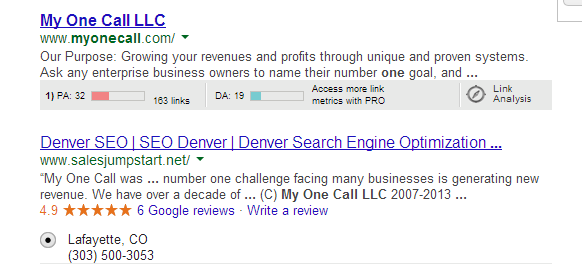
Here’s what you find under My One Call LLC

What ever review sites show up (Google, Yelp, Youtube)  you should encourage the web owner to ask for more positive reviews on those sites and make them aware of any non positive mentions or reviews.

MOZ Rankings: Go to MOZ.com and log in.

Run an open explorer report on the main URL. Note and communicate the Page Authority, and Number of links. Down load a monthly back link report.

Competitive assessment:  Search for their main keyword and city (if Local)  Note the top ranked sites.  Make a note of the top three. (do not include directories)

Go to moz.com open Site Explorer.  Add top three competitors to “compare link Metrics ”Copy report to client.

Run Open Site Explorer for the top three sites. Look for linking opportunities.

Provide a brief summary of work completed this month or period.

Social Mentions

Continued Web site presence on My One Call LLC sites

Tips and updates.

Research

Links

Site review

Reputation check

New Keyword ideas

New content ideas.  (FAQ page)

Rankings for main keywords.

Traffic reports.

By Mike Bayes

My Google Plus Profile: https://plus.google.com/u/0/+MikeBayes/about

More about us www.salesjumpstart.net

Want to learn more about Google Plus and promoting your business?

Try these two G+ Guru’s (my words not theirs)

https://plus.google.com/u/0/+JesseWojdylo/posts

Stephan Hovnanian is a true G+ Master! https://plus.google.com/+StephanHovnanian/posts

Enhanced by Zemanta

Using Google+ Communities for Business

Have you ever considered building an online community for your business?   There are many ways to do this- from building and hosting your own using open source software to using an online community builder or building one with tools on the existing social networks – Facebook and Linkedin, for example, both have offerings in this area.

One of the newest, and potentially most significant players in this market is Google.   First launched in December of 2012 Google Communities provided an easy set-up, but a minimal feature set.   It had the advantage, however, of a large audience of potentially interested members, having been built as an integral part of Google+.   I have built several communities on Google+ – including one with over 20,000 members, so I know some of the ins and outs of this technology and would like to help save you some time and do what I can to help your community be a success should you decide to build one.

English: Google+ wordmark
English: Google+ wordmark (Photo credit: Wikipedia)


First, it is important to understand the difference between what Google calls “communities” – but goes by many names in the industry (“Groups” on Facebook other services, “online forums” with some other technologies) and a “page”.  A page is a way of promoting your business that is offered by Google, Facebook and Linkedin.   A page is like a simple website with an administrator can post information and users can comment.  Users cannot, however, initiate a post.  With a community users can both comment, as they can on a page, but they can also initiate posts.    Communities can also be either public or private while most pages are public since they are used for promotional purposes.

This can make the moderation of these communities a little more complex than just the standard customer relations function of addressing and managing comments as you would have on a page.  Let’s take a hard look at Google Communities – both its strengths and weaknesses to see if it could be to the advantage of your business.   I’ll also try to give you a few tips on building your one community on Google+ should you decide to go that route.   First its strengths:

Advantages to Google Communities

1.  It is a snap to set up.   It is so easy to setup a Google community it will probably take me longer to write this post.   The is a bit of an exaggeration, but you can get the basic setup finished in five minutes or so, and improve it from there.  The setup is just not a big deal.

2.  It is good for relationship building.   Since users can initiate posts, there is less of a “pearls before swine” quality to the engagement.   While you will want some moderation guidelines, basically your members can say whatever they want whenever they want.  This will have the effect of having the relationship be more “authentic” – you are basically putting yourself out there.

3.  It can enhance your stature in a subject area.   Since you will be managing a community where people can freely express themselves, you will have to be fair and allow a different views to be expressed – in some cases possibly from competitors.  .  Depending on the subject area, this may help you to be seen as an expert in this area.

4.  You will learn from it.   Since a well managed community will have a variety of views being expressed you may learn some new things and get new ideas.   With a “page” setup you might just be hearing what you want to hear.  Sometimes when a discussion gets lively on a community some great ideas can be generated, and new ways of looking at things can be revealed.

5.  There may be some SEO Benefit.    Google indexes posts in its search engine your business might get a bit more exposure through it.  In addition, with Google Communities you are allowed to display up to 10 links on the Community home page and these can be links to your business or other resources for your members.

7.  Hangouts and Hangouts on Air.   While the technology for communities themselves may be more or less traditional – and even have less functionality than most systems, there is an important exception.   Hangouts – Google’s name for video conferencing, is integrated with communities and is an amazing technology.   These hangouts let you meet in a live videoconference with up to 10 people which can take your community to a whole new level.  There is also a “Hangouts on Air” – currently not as well integrated but still possible, that lets you “broadcast” these hangouts and record the to Youtube.   This alone may be reason for you to select Google communities if you have a subject area and population of potential members you feel could benefit from this kind of video presentation.

Disadvantages to Google Communities

1.  It is hard to get new members.  Don’t expect an immediate flood of member requests once you setup your community.  Since they are so easy to set up there are tens of thousands of them – maybe more.   You may have to build your community one member at a time at first.   It is also possible that your best potential members aren’t active on Google+ at all, and even if you persuade them to join they won’t participate much.

2.  Moderation can be a challenge.   It would be nice if these things “ran themselves” but they don’t.   Posts that are low quality or off topic are frequent, and you may have to use your best diplomacy skills – or your hammer –  to address these.   It is not uncommon for “drama situations” to break out and it is even possible for whole communities to “melt down”.   As community owner, you will be responsible for this.

3.  It’s Time Consuming.   Managing your community – including approving new members, participating in discussions,  moderating disagreements, encouraging quality and posting your own content can be a major time sink.   This must be weighed against the advantages of having a community.

4.  Communities compete with each other.  Google set up communities so that anyone could start one on any topic – and they can even have identical names as other communities.  This means that there are many overlapping and competing topics all competing for the same audience.   The is particularly true of the larger communities with broader topic areas – it is probably best to not compete with those communities unless you are willing to invest substantial effort.

5.  Spam is a major issue.  Google communities are absolutely plagued with spam.   They have a spam filter that is pretty good at weeding most of it out, but you will still see it.  There is also a problem with “near spam” –  posts that are just bad for whatever reason.  While this is mostly an issue on the public communities, it is not unheard of on the private communities either.

So should you do it?

The answer is, of course, “it depends”.   Don’t do it “just because you can” however, anyone can set these up and an empty community won’t do you any good nor will one you work on extensively that never gets “traction”.    Think first about precisely what you want to accomplish with your community and then carefully weigh the advantages and disadvantages listed above.   At this point in the development of communities it is unlikely that a broad topic will work unless you are already a recognized authority in that area and have a ready population of followers.  That is not to say private communities won’t work, however, or even public communities in niche topic areas.

Going for it?  Here are a few tips.

So if you have weighed the advantages and disadvantages carefully, and you think it can help your business or practice area, here are a few tips to help you get started:

1.  Set up the community completely before you invite anyone.  As we discussed here, the initial community setup can be done in just a few minutes, but doing it right can take considerably longer.   Get everything ready.  Have some good web copy for your descriptions, set up your posting categories and write some moderation guidelines. – you will need them later.

2.  Have content ready.   Consider “seeding” your community before you even invite anyone with a few interesting posts that set the “tone” of the kind of posts you want in your community.   The last thing you want is for new members to to join an empty community.   It might even be a good idea to have several posts pre-written for future postings.

3.  Identify Prospective Members.   If you are already active on Google+ identify everyone in your circles who you think might be interested in your community.  Make a special circle for these prospects.   If you aren’t active on Google+ it may be a tougher slog, but do some searches on your topic area and build a circle based on this interest.

4.  Invite your best prospects.   Try to get a commitment from as many of the people you know who might be interested.  Write them and tell them what you want to accomplish and enlist their support.   After you have done this, send an invitation to these prospects.

5.  Start engaging.  Try to get a conversation going with these initial members.   Use your best content if necessary.   Do whatever you can to “make it interesting”.

6.  Invite a “second wave” of prospects.   Now take the rest of that circle you have built and invite those potential members.   Write a good introduction about why you think will be a good community.  Continue promoting your community however you can as an ongoing effort.

7.  Select a Moderator.   Ask one of your members to help with moderating the community.  This will not only reduce your workload a bit, but will have the added benefit of making your community look a bit more “established”.

That’s about the best advice I can give you.   The rest is up to you.  Wishing you the best!

Enhanced by Zemanta

1.2 Million Dollars in New Leads, With 1 Page and No Off Site SEO.

 1.2 Million Dollars in New Leads, With 1 Page and no off site SEO.

I know, SEO is a very difficult to understand these days… but we all must conceed there is “something” that determines where Google and other search engines place a result from a search query. Understanding how that works (or at least some of how that works) is what a good search engine optimization company does.

Image representing Google as depicted in Crunc...


The process of understanding that is to watch carefully how certain pages move up and down in the search engine results for certain specific keywords.  And when you see positive movement, figuring out what may have caused it. This is where it gets really tricky, especially for an SEO who is actively working on marketing a clients website, because in my humble opinion, Google does some very interested things concerning “timing” of search rankings.

The short version is, what you see happening today may only be temporary, and based on Google wanting you to think what you did in the last few weeks, or month may have been the cause of the change, when, the truth is, they’re just waiting to see if you react to a positive change by doing more of what you did, and then seeing that you do, they ZAP your silly little SEO process and drop your rankings like a bowling pin going down for a 7-2 spare pick up.

It’s the typical “Google is smarter than you syndrum”. Look,I am pretty sure they only hire people with an IQ higher than 195, and thats for part time positions. You are NOT going to outsmart them… really. Go ahead.. try.

So what do you do?  Well, doing nothing with a pages SEO is a great process. You see , once you get past the basic’s of some good quality promotion of a site, and making sure the site has decent if not great on page optimization, the rest falls into the hands of the audience.

The people who search will have a much larger impact on your pages ranking than any backlinking or SEO wizardry you may do.

English: White hat seo symbolizes good ethic t...


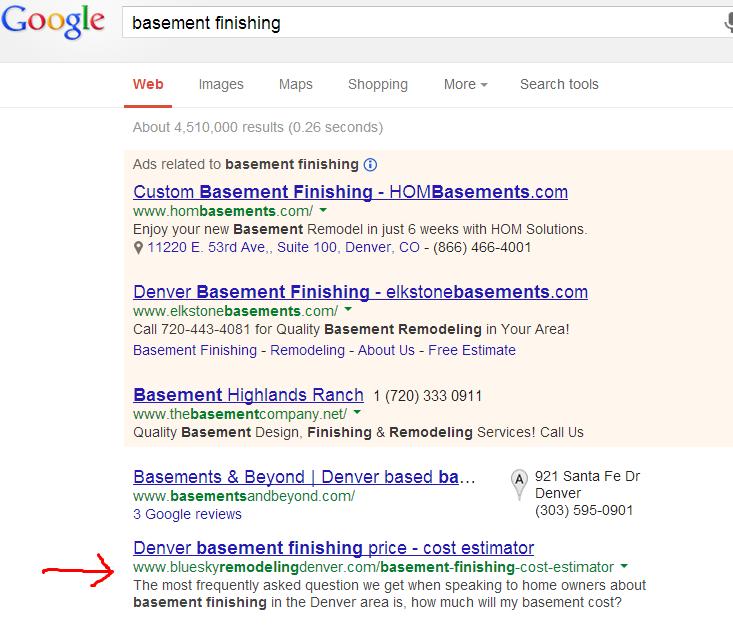
Here is my example. This page is ranked very highly in about 7 different city searches for the major keyword.  In other words, if I set my browser to Denver, or one of the major suburbs around denver, and type in the keyword, with no location intent (a city or zip)  this page is in the top 2.  That by itself doesn’t mean much, but it also brings in a huge amount of the right traffic for the client. This year they are getting about two proposals a month from the page, with an average value of 50K.

8-18-13 blue sky screen google basement finishingScreenshot_3

 There aren’t a bunch of backlinks to the page.  We haven’t done any SEO to the page except the concept, and the onsite work… meaning just the basics.. title tags and such. So why does this page rank so well?  People LOVE it! The click through rate is huge, and the time on page is excellent.

This page is so popular that I know of at least two other competitors to the company that use it to show their prospects what a basement finish might cost. Now thats a great testimonial.

So what’s the most important element to SEO?  Popularity of the page you build. (past the basics,. aAnd, isn’t that exactly the way it should be?  I told you those Google people were smart.


Enhanced by Zemanta

Ecommerce for Solopreneurs

Ecommerce for Solopreneurs

By Rob Gordin. 

Suppose you want to start selling online, but you are a one man (or one woman) show.  What solution fits your needs the best?   How much work will it be to get up and going?   How much will it cost?  Is it flexible and easy to maintain?  Does it provide a growth path for the future?

These aren’t easy questions to answer, and there are a mind numbing number of options, but this article will give you a few things to consider in making a rational decision on the best eCommerce system for you.  This is not intended to give you every possible option in selecting a platform for your  business  – that would be all but impossible.   Rather, we would like to provide a “framework” for ways you can think about it so you can make rational decisions on the eCommerce approach that is best for you.

There are two things that Solopreneurs generally don’t have in great abundance – the first is time, and the second is of course, money, so those will generally be the primary consideration, but there are many others.   Let’s take a look at the possible options, and note that there is a great deal of overlap with each of these approaches.

1.   Use an open source platform.   Many solopreneurs are into DYI (do it yourself) approaches, so these are always popular.  Basically this just means you select one of the many solutions that have been developed by the open source community, then configure and modify it to fit your needs and then host it on your own server and domain.  A few of the more common examples in this genre:

  • Zencart

  • Magnito

  • OpenCart:

  • osCommerce:

  • Miva

  • PrestaShop

The Upside:  For all intents and purposes, you will “own” this system and can do what you want.   There will be no monthly service fees beyond what you pay for hosting, and no transaction fees beyond what you pay to your credit card payment provider.  There will also be a great deal of flexibility in development – with some effort, you should be able to get the exact “look and feel” that you want.

The Downside:  This is not for the faint of heart.   Even if you are technically skilled, this is often a “trip into the weeds”.   You very will may find yourself working far more on your technology, then you are on selling and marketing your products and services.   The maintenance and upkeep of these systems can be daunting, and technical support can be spotty at best.   In the case where the open source software company also has a paid version, there will usually be less functionality and the free version is mostly meant to eventually get you to upgrade to the paid version.

2.   Use a Content Management System.   This is somewhat similar to using open source software, except in this case software that is designed for managing content on websites is used, and a plugin of some kind is used to provide the eCommerce functions.   Depending on the technology selected, this can be either easier or more difficult than using open source software designed specifically for this purpose.  A few of the common examples in this genre:

  • Joomla with VirtueMart Plugin

  • Drupal with Ubercart Plugin

  • WordPress with WP e-Commerce (and others)

The Upside:  Most solopreneurs who use this approach are already using it to manage their website so it has the advantage of being well integrated with what is already in place.  It can often be a superior way to showcase products, as not everything is oriented to :”selling” so product displays can be mixed with other content.

The Downside:  This is usually not quite as flexible as using an open source system specifically designed for eCommerce.  Technical support is usually through online forums and can be frustrating and time consuming.

3.   Use Commercial Software.   This is also similar to the “free open source” approach, but in this case solopreneurs elect to pay for their software solution – either through a one time or ongoing licensing fee.  Note that “open source” and “free” are not exactly the same thing.,  Software can be open source – meaning you have full access to the source code and can modify it if you wish, but it still requires a licence fee.   Also, some commercial ecommerce software does have free versions with less functionality.   A few of the common examples in this genre:

  • Magnito (also has free version)

  • CS-Cart Shopping Cart Software

  • X-Cart Shopping Cart Software

  • Pinnacle Cart

The Upside:   Purchased ecommerce store software is generally has a higher initial cost but there is only a single payment and then you own the software or have a permanent licence.  Support is generally superior and you have an accountable party and “someone to talk to” if something goes wrong.   Purchased software is also usually more flexible and can be modified to suit your needs.

The Downside:   Primarily the up front fee, and also the danger of being “locked in” with a single vendor.   It is not unheard of for these companies to go out of business which will leave you with no growth path.

4.   Use a Hosted Platform.   This is an approach where you do not host the ecommerces software at all, but rather use a host to provide this service.  Typically you will “embed” the shopping cart into one or more of your website pages, but is is also possible to use many of these as standalone platforms – even while retaining your domain name.  Be aware that there is a wide range of functionality with these platforms.  Some hosted platforms provide no more than an “add-on” cart which is deployed on an existing website by copying a few lines of HTML, while others provide a complete stand-alone website builder can be added onto an existing site or used independently as your entire website.   A few of the many examples in this genre:

  • Yahoo Stores

  • Intuit Ecommerce

  • Shopify

  • Paypal Shopping Cart

The Upside:  This is a great solution for beginners because the hosting is included and there is usually no technical setup required.   There are some great deals out there especially if you don’t have a ton of different items to sell.   In general, the will support multiple payment providers so that is one less thing to worry about.

The Downside:  There is usually a monthly fee and often transaction charges.   Many of the deals out there are “loss leaders” and If your store is successful there could be some hefty fees and service charges as you grow.  When the platform is provided without charge, some companies put advertisements on your store which can be a turnoff to your customers. It can also be extremely difficult to migrate to another platform once you have selected one of these services.  

5.  Get in Bed with a Giant.  This is an approach where you use the solutions provided by one of the major players in the ecommerce industry.  At the moment, there are really only two “giants” to consider – Amazon and eBay, but we can expect all the major social networks – Facebook, Google+. Twitter and Pinterest to have offerings in this area.   The two major examples in this genre:

  • Amazon Webstore

  • ProStores Store (An Ebay Company)

The Upside:   These sites know how to sell, and there may be some advantages to their dominant market position.   If you are selling on Amazon or eBay anyway, this is something you probably want to consider.   There are generally multiple payment options and since these sites are highly “trusted” you may get more sales by associating with them.

The Downside:   Since these services are associated with these giant companies, your branding may become overwhelmed by the larger company.   The solutions are often more “canned” and less flexible than other approaches.

6.  Get Social.   This is an approach where you sell primarily socially – either through an existing social network or through sites that have been specifically set up for this purpose.  This is an emerging genre and we can expect to see more players in this area, including all the major social media companies.  A  few examples in this genre:

  • Etsy  (mostly for art and handcrafted items).

  • Envato (for digital goods)

  • Threadflip (clothing)

  • FriendShopper

  • Vendio Ecommerce (for Facebook stores)

The Upside:  This sites often specialize in niche areas, and come with a built in community of prospective buyers – a big plus for the solopreneur.


The Downside:  As with hosted services, the growth path is uncertain and you may find yourself needing to do a migration at some point – which can be even more difficult since you may have active buyers and prospects in the community.  Also, since the genre is new, no one really know what will happen.  New players will almost certainly emerge, and there may be a shakeup with some of the existing companies.

7,  Go Mobile.    More and more people are buying off their mobile devices – smart phones and tablet computers.   While this genre overlaps somewhat with the others, it is worth considering in its own right.   A few examples in this genre:

  • Square

  • Venda

  • Shopgate

The Upside:  This, along with social commerce, is likely to be “the wave of the future”.  Most ecommerce providers will be designing support into their platforms if they haven’t already

The Downside:   Many new and smaller players that may not provide support for more traditional methods.   Some “trendy features” may not stand the test of time, and not all products are ideal for being sold on mobile devices.

***

At best, a report like this can just scratch the surface on an industry as broad and multidimensional as ecommerce.   For all intents and purposes, you can expect just about every Internet technology company to try to get a “piece of the action” this, for the simple reason that it is “where the money is”.   Most players in this industry will be integrating different approaches so it shouldn’t be to difficult to find the provider that is best for you.

For most solopreneurs, however, the best solution will likely be to use one of the hosted platforms.  These will allow you to get up and selling almost immediately, which you can’t do with either open source, content management or commercial software.

Regardless of ths solution you select, do your homework.   Select the approach you think works best for you and write up some specifications for your needs before you even look at the prices and feature sets of the different systems.   Avoid any services  require you to pay a percentage of your sales and “free trials” are all but useless.  Even with hosted platforms, there will be some effort in setting this up so you want to select the system that best matches your needs.

 One more thing – don’t delay.  If you have products to sell, you can be making money sooner than you think.

About the Author. Introduction. Rob is the founder and owner of one of the largest business communities on Google Plus.  You can find his information on his G+ profile. Because he interfaces with over 25,000 small business owners he has a unique knowlege of that market. He also is the founder of http://world-startups.com/



Enhanced by Zemanta

You don’t need to learn to sell. You need to learn how to generate prospects.

You don’t need to learn to sell. You need to learn how to generate prospects.The truth is, in 99% of the sales challenges  I have been involved with, the problem isn’t in the person’s ability to “sell” its in the fact that they have no one to sell too.

Mike closing2First, selling isn’t different than any other skill set, it must be learned.  When we hear someone say someone was a “born” salesperson, it’s really not true. That’s like saying Peyton Manning was a born a quarterback, and discounts the years of very hard work and dedication he (or anyone very good at what they do) has put into their profession.

In my experience the absolute most important part of selling is having a plan of how you are going to generate prospects. Small business owners who state, I don’t know how, or I am bad at sales, are thinking about the actual process of presenting and closing a new customer in many cases, when what they are really talking about their ability to generate leads and prospects. The truth is, in 99% of the cases I have been involved with, the problem isn’t in the person’s ability to “sell” its in the fact that they have no one to sell too.

The simple and fairly quick process of having a plan, and working the plan will solve this.

So here are some simple steps for the business owner who doesn’t know how to generate prospects. It’s not original, and you will find this advice by reading any of the great sales or marketing guru’s.

1.) Identify who is most likely to buy your service.

2.) Build or buy a list of these businesses

3.) Develop a compelling reason for them to contact you, or speak with you.

4.) Write a letter (can be email). In the letter describe a problem you solved for some business like theirs. Drop names of happy clients. Offer something in the PS  (It’s worth paying a few hundred dollars to a professional direct mail copywriter) Mail the letters.

5.A) wait for them to call you

5B)  Call them and asked if they read your letter.  What did they think?

6.) Repeat with new letter.

7.) Repeat with new letter

(I will be writing or asking an expert to write a blog on each step mentioned above with instructions and details on each.) Subscribe to be notified. (I mean it, subscribe NOW)

You may be asking… that’s it?  Yup that’s it.

Your success will depend on:The value of your service to the target market. Make it (your service) as good as possible before you start all this. The quality of the list, and where you got it. If it’s opt in, great. If you buy it, you need to send a bunch of letters. The quality of the letter or email you send.  The offer you make them and your follow up.

In my experience you will have something like three times the success if you are brave enough to call the list. I’ve seen success rates as high as 50% on this program.  Overall we average a 14% response or generated prospect rate on these programs.  Think about that.

You send 1000 letters.  You get 140 prospects. You sell 35%. You have 49 new customers.  The cost?…. depends on how you implement it, but figure a $1.00 per letter with printing and stamps and maybe a copywriter.

As far as the actual “sales” process with these prospects, remember that the word sales means to persuade. If they called you, you’re 80% there.  Now relax and ask then the questions you have developed on your sales questionnaire. Oh… that’s on another blog here…

And then, ask them when they would like to start.

Congratulations, you are now better than at least 60% of the salespeople I have met who do no targeting, little or no qualifying and never close.

Don’t know how to sell?  Who cares, because now you know how to generate prospects.


Enhanced by Zemanta